

Knowt Flashcard App Review: Features, Pricing, and Who It's Best For (2026)
A structured, honest profile of Knowt covering what's genuinely free, how the spaced repetition algorithm works, what AI features cost money, and which students will get the most out of it — and which won't.
Updated:
Knowt at a Glance
| Attribute | Details |
|---|---|
| Tool Category | Flashcard app with AI study tools |
| Available Platforms | Web, iOS, Android, Chrome extension |
| Pricing Model | Freemium (Basic free / Ultra paid) |
| Free Tier Available | Yes — unlimited cards, all core study modes |
| SRS Algorithm | Proprietary, Ebbinghaus Forgetting Curve-based (not SM-2 or FSRS) |
| AI Features | PDF summarizer, video summarizer, live lecture note-taker, PPT summarizer, Kai chatbot (Ultra only), Snap & Solve (Ultra only) |
| Best For | Budget-conscious high school and college students, AP exam preppers, Quizlet migrants |
| Last Reviewed | June 2026 |
What Is Knowt?
Knowt is a flashcard and notes platform that positions itself as a free alternative to Quizlet, with AI-powered tools layered on top. It is built by Knowt Inc. and targets high school and college students who want more than basic flashcard flipping without paying for a subscription.
The platform's core pitch is straightforward: create flashcards from your own notes or uploaded materials, study them through multiple modes including spaced repetition, and use AI tools to speed up the content-creation step. The free plan is genuinely generous by current market standards — more on that in the pricing section.
Knowt claims that a significant share of AP students used the platform during the May 2025 exam season. That figure comes from Knowt's own marketing materials and has not been independently verified, so treat it as self-reported rather than audited data.
Available Platforms
Knowt runs on four surfaces: web browser, iOS, Android, and a Chrome extension. There is no dedicated desktop app for Windows or macOS, though the iOS app is compatible with Apple M1 and later Macs through the App Store.
- Web — the full feature set is available at knowt.com, including all study modes, AI tools, and the AP Exam Hub.
- iOS — rated 4.7/5 from approximately 10,000 ratings on the App Store (version 3.7.0, May 2026). Compatible with iPhone, iPad, and M1+ Macs.
- Android — rated 4.5/5 from over 7,800 reviews on Google Play, with 500,000+ downloads. The app contains ads and in-app purchases.
- Chrome extension — handles YouTube video summarization and Quizlet set import. It also integrates with LMS platforms including Canvas, Moodle, and Google Classroom. Important caveat: the extension does not support all websites, and its reliability is highest on Quizlet and YouTube.
If you primarily study on a Windows or macOS machine, you will use the web app rather than a native desktop client. The web version is fully functional, but students who prefer offline-first or native desktop experiences will find this a limitation.
What the Free Tier Actually Includes
Knowt's Basic plan is free and, unlike many freemium tools, does not cap the number of flashcards you can create or restrict core study modes behind a paywall. Here is what you get without spending anything:
- Unlimited flashcard creation — no card limits, no set limits.
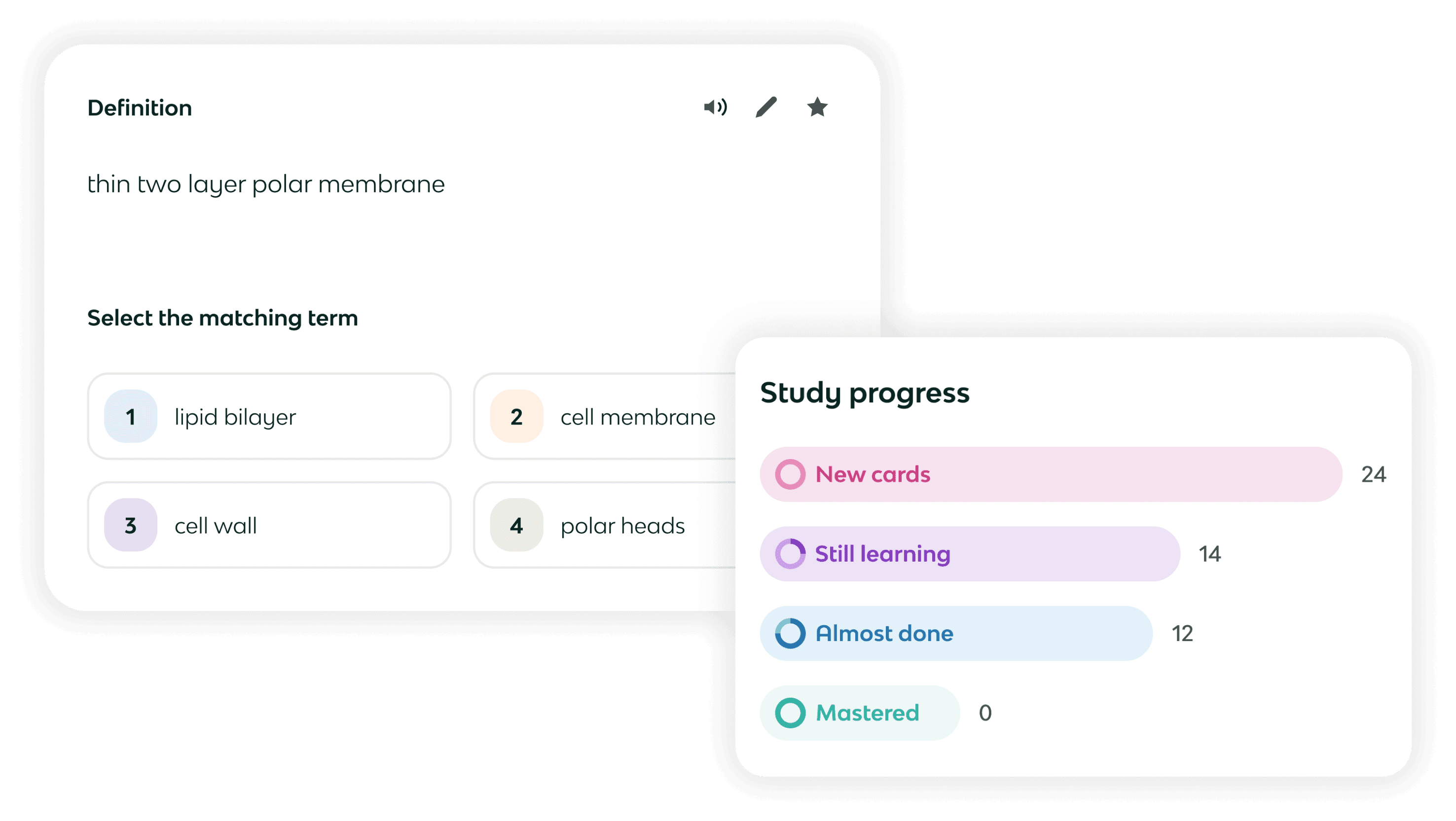
- All five core study modes: Flashcard, Learn, Matching, Practice Test, and Spaced Repetition.
- Knowt Play (competitive game mode, including Race mode for team play).
- AP Exam Hub access — free AP study guides organized by subject and unit.
- Quizlet import tool — paste a public Quizlet set URL to bring your existing decks into Knowt.
- Access to 5 million+ community notes and flashcard sets created by other users.
- Basic AI usage — PDF summarizer, video summarizer, and lecture note-taker are available in limited quantities per month (Knowt does not publish the exact monthly limit for free users).
For most students who want to create their own flashcard sets and study them across multiple modes, the free tier is a complete workflow. The AI limits become relevant only if you are uploading large volumes of PDFs or videos regularly.
Ultra Paid Tier: What You Unlock and What It Costs
Knowt Ultra is the only paid tier as of June 2026. The Plus tier that appeared in some older sources no longer exists as a distinct option.
| Plan | Price | Billing |
|---|---|---|
| Basic | Free | — |
| Ultra Annual | $12.49/month | Billed upfront at $149.99/year |
| Ultra Monthly | $24.99/month | Billed monthly |
Ultra adds the following over the Basic plan:
- Unlimited AI summaries (PDF, video, PPT, lecture) within monthly upload caps.
- Kai AI chatbot — explains wrong answers, clarifies flashcard content, and includes a voice study mode called 'Call with Kai' (introduced October 2025).
- Snap & Solve — photograph a problem and get an AI-generated answer.
- Unlimited auto-graded assessments.
- Teacher tools and AP mock exam assignment features.
- Additional assessment question types.
For context on pricing volatility: the App Store in-app purchase history for Knowt shows Ultra Annual at $59.99, $95.99, $119.99, and $149.99 at various points — plus monthly options ranging from $14.99 to $24.99. Third-party reviews published between January and May 2026 list figures as low as $9.99/month annual. The authoritative current figure is from knowt.com/plans, which showed $12.49/month annual ($149.99/year) as of June 2026.
Study Modes Explained
Knowt offers six study modes, all available on the free plan. Each serves a different stage of the learning process:
- Flashcard mode — classic front/back card flipping with a sorting feature that lets you mark cards as known or still learning.
- Learn mode — an adaptive mode that mixes multiple choice, true/false, fill-in-the-blank, and written response questions. It adjusts based on your performance and is the mode Knowt recommends if your exam is within 30 days.
- Matching — a drag-and-drop game that pairs terms with definitions. Good for quick vocabulary reinforcement and a low-stakes way to engage with new material.
- Practice Test — auto-generates a quiz from your flashcard set. Useful for simulating exam conditions before the real thing.
- Spaced Repetition — exam-date-driven scheduling that spaces card reviews across days to cover all material before your target date. Covered in detail in the algorithm section below.
- Knowt Play — a competitive game mode for solo or group study. Race mode, added in late 2025, supports team play — useful for classroom or study group contexts.
AI Features: What They Do and What They Cost
Knowt's AI tools are designed to reduce the time between having source material and having a studyable flashcard set. Here is how each feature works and what plan it requires:
| AI Feature | What It Does | Free Tier | Ultra |
|---|---|---|---|
| PDF Summarizer | Upload a PDF; receive a summary, auto-generated flashcards, and a practice test | Limited monthly uses | Up to 100 PDFs/month |
| YouTube Video Summarizer | Summarize structured educational video content via Chrome extension | Limited monthly uses | Up to 100 videos/month |
| Live Lecture Note-Taker | Record lecture audio; receive notes and flashcards | Limited monthly uses | Unlimited (within caps) |
| PowerPoint Summarizer | Upload a PPT file; receive summary and flashcards | Limited monthly uses | Unlimited (within caps) |
| Kai AI Chatbot | Explains wrong answers, clarifies concepts, voice mode via 'Call with Kai' | Not available | Unlimited chats |
| Snap & Solve | Photograph a problem and receive an AI-generated answer | Not available | Available |
The Chrome extension's video summarization works best on structured educational content like recorded lectures or Khan Academy-style videos. It is less reliable on casual or conversational content. The extension also has partial site support — it does not work on all websites, and compatibility outside of YouTube and Quizlet is inconsistent.
How Knowt's Spaced Repetition Works
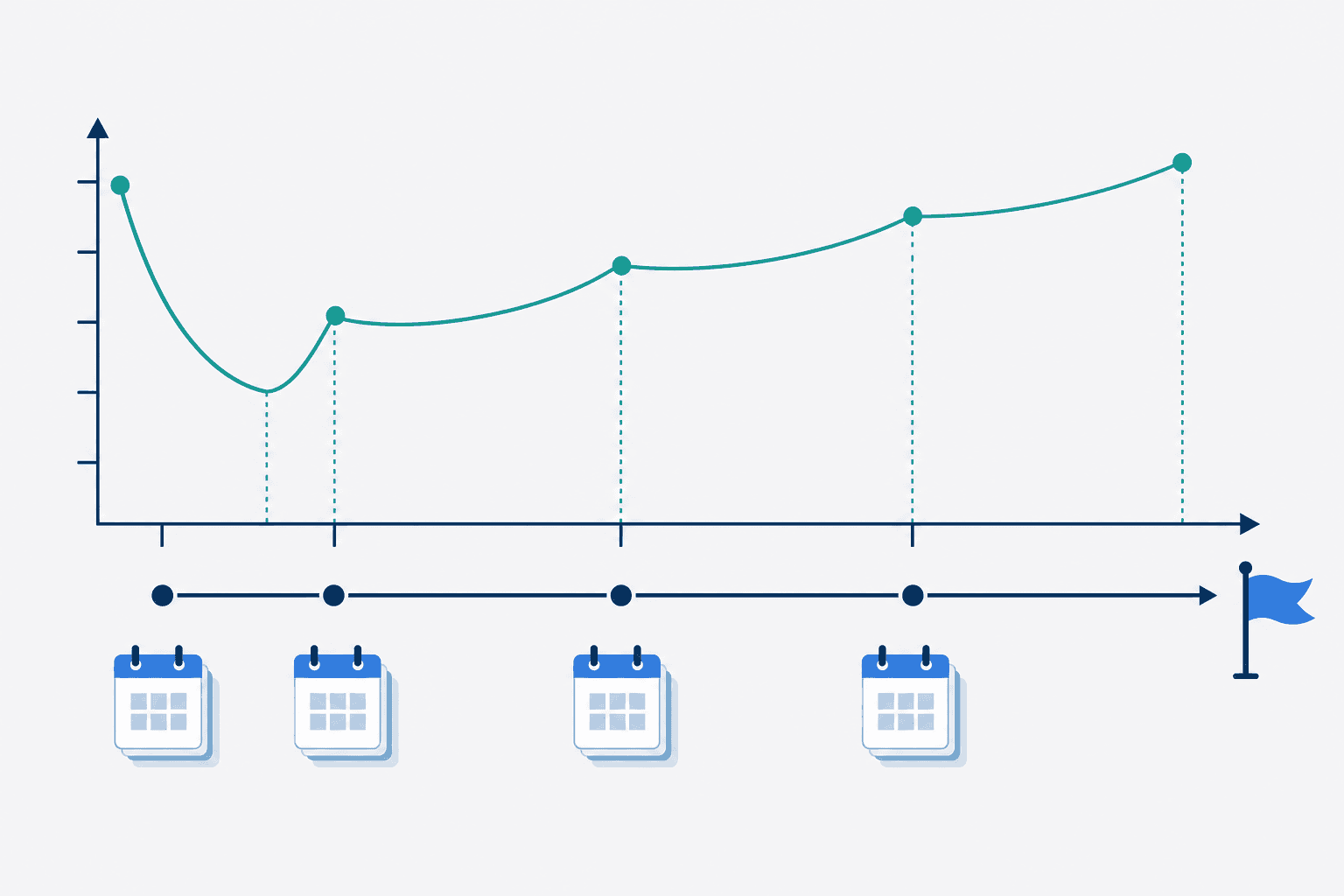
Knowt's spaced repetition mode is built around a single input: your exam date. You tell Knowt when your test is, select how many new cards you want to study per day, and configure time intervals. The algorithm then auto-calculates a review schedule designed to cover all cards in your set before that date.
Knowt's spaced repetition feature uses a carefully designed SRS algorithm based on the Ebbinghaus Forgetting Curve that aims to help you retain information over a longer period of time.
That description comes directly from Knowt's own blog. The algorithm is proprietary — it is not SM-2 (used by Anki) and it is not FSRS. Do not conflate these. Knowt has not published the specific mechanics of its interval calculation beyond the Ebbinghaus Forgetting Curve description.
Within the mode, you can configure which question types appear — flashcard, multiple choice, true/false, or written response. The algorithm also gauges card difficulty and surfaces harder terms more frequently. On mobile, you set your exam date at the start of each session.
Compared to Anki, Knowt's SRS is significantly more beginner-friendly. Anki requires you to manually configure initial intervals, ease factors, and review settings — or install community add-ons to do so. Knowt automates all of that from the exam date. The trade-off is that you cannot manually set specific intervals the way Anki allows, which matters for advanced users who want fine-grained control over their review schedule.
Known Limitations and Reported Issues
Knowt has real limitations that appear consistently across independent reviews and user feedback. These are not edge cases — they affect the core study experience for a meaningful number of users.
- App stability bugs — Google Play reviews confirm app loading failures and login loops. One highly-upvoted review describes the app requiring 5+ minutes to load before often failing entirely. Independent testing has also reported flashcards not saving after a session.
- Limited SRS interval customization — you cannot manually set specific review intervals the way Anki allows. Knowt auto-schedules from your exam date, which works well for most students but is a hard constraint for power users.
- Chrome extension partial site support — reliable on YouTube and Quizlet, inconsistent elsewhere. Do not assume it will work on your specific course platform without testing.
- AI accuracy requires manual review — approximately 90% accuracy means generated flashcards and summaries contain errors. Treating AI output as ready-to-study without reviewing it is a risk, especially for high-stakes exams.
- Ads on the free plan — some users describe them as intrusive. The ad experience has reportedly worsened as Knowt has expanded its paid tier.
- Monthly AI caps even on Ultra — 100 PDFs and 100 videos per month is generous for most students, but it is not unlimited. Heavy users uploading daily materials may hit the ceiling.
- No offline mode — Knowt requires an internet connection. Students who study in low-connectivity environments (commutes, rural areas) cannot rely on it as a primary tool.
- Feature creep behind paywall — at least one highly-upvoted Google Play review notes that features previously free have moved to Ultra. This is a real risk with any freemium platform and worth monitoring if you are a long-term free user.
Who Knowt Is Best For — and Who Should Look Elsewhere
Knowt is a strong fit for specific student profiles. It is not the right tool for everyone, and being clear about that is more useful than a blanket recommendation.
- Best for budget-conscious students — the free plan is among the most complete in the flashcard app market. Unlimited cards, all study modes, and basic AI at zero cost is a genuinely strong offering.
- Best for AP exam preppers — the AP Exam Hub, FRQ practice room, and AP mock exams (added in the March 2026 update) make Knowt particularly well-suited for AP coursework. These features are free.
- Best for students migrating from Quizlet — the Quizlet import tool is seamless for public sets. If you have built up a library on Quizlet and want to move without rebuilding everything, Knowt is the most direct path.
- Best for flashcard-first learners — if your primary study method is creating and reviewing flashcards, Knowt's six study modes give you more variety than most free alternatives.
Knowt is not the right fit for:
- Advanced SRS power users — if you need granular control over review intervals, ease factors, and algorithm parameters, Anki is the better tool. Knowt's SRS is automated and not manually configurable at that level.
- Students who want the cheapest paid plan — Quizlet's annual paid plan has historically been cheaper than Knowt Ultra. If you need a paid plan and price is the primary factor, compare current pricing on both platforms before deciding.
- Offline-first workflows — Knowt requires internet access. If you study regularly without reliable connectivity, this is a hard limitation.
- Students who need integrated note-taking and flashcards in one system — Knowt can generate flashcards from notes, but it is not a full note-taking environment. RemNote handles the integration between notes and spaced repetition more cohesively if that workflow matters to you.
Recommended Alternatives
If Knowt does not fit your situation, here are the most relevant alternatives and the specific use cases they serve better:
- Anki — the strongest choice for students who need advanced SRS control. Anki is free on desktop and Android (paid on iOS), open-source, and supports FSRS and SM-2 with full interval customization. The learning curve is steep, but the algorithm flexibility is unmatched. Best for medical students, language learners with large vocabulary loads, and anyone who wants to configure their review schedule precisely.
- Quizlet — the largest library of pre-made flashcard sets available. If you want to study from community-created decks rather than building your own, Quizlet's set volume is a significant advantage. The paid plan has historically been cheaper than Knowt Ultra. Best for students who want to study from existing decks rather than create new ones.
- Brainscape — uses a confidence-based SRS where you rate how well you know each card on a 1–5 scale. The algorithm adjusts based on your self-reported confidence rather than response time. Best for self-paced learners who prefer to control their own difficulty ratings.
- RemNote — integrates note-taking and spaced repetition in a single environment. You write notes and generate flashcards from them without switching tools. Best for students who want their study system built into their note-taking workflow rather than as a separate app.
Comments
Join the discussion with an anonymous comment.