
RemNote Review: Features, Pricing, and Who It's Best For
A structured profile of RemNote — the all-in-one note-taking and spaced repetition app used by 1M+ students — covering its core features, FSRS/SM-2 algorithms, AI tools by tier, current pricing, honest limitations, and which student types it genuinely suits.
Updated:
What Is RemNote?
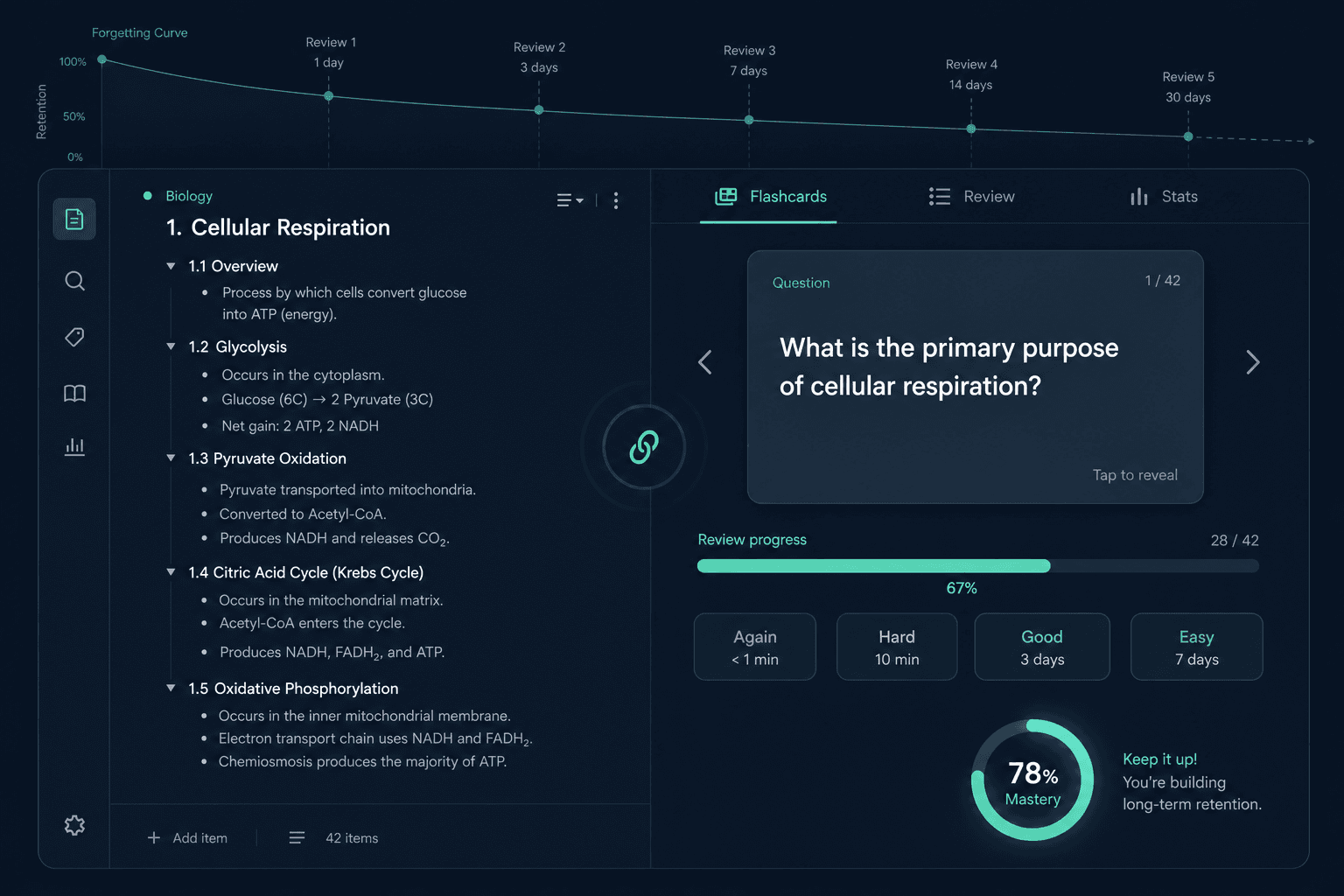
RemNote is an all-in-one study platform that combines outliner-based note-taking, spaced repetition flashcards, PDF annotation, and AI-generated study materials in a single workspace. Rather than forcing students to switch between a notes app and a separate flashcard tool, RemNote treats every note as a potential flashcard — the same document you write in becomes the system you review from.
The platform is used by more than one million students worldwide, with a notable presence at medical schools including Weill Cornell, Johns Hopkins, and Stanford Medicine. RemNote raised $2.8 million in seed funding in 2021, led by General Catalyst, which positioned it as a serious long-term product rather than a side project.
The core value proposition is integration. Anki gives you powerful SRS with no note-taking layer. Notion gives you flexible notes with no memory system. RemNote occupies a distinct category: a study platform where the note-taking and the retention system are the same thing, not two tools bolted together.
Note-Taking System
RemNote's note-taking layer is built on an outliner structure called the Rem. Every line is a Rem — a discrete unit of information that can be nested, linked, referenced, and converted into a flashcard. This hierarchical format suits students who think in structured outlines: lecture notes become a tree of concepts, each of which can be reviewed independently.
Beyond typed notes, RemNote supports handwritten notes with sketch-to-text conversion for tablet users, and PDF and slide annotation that lets you highlight and comment directly on uploaded documents. Both annotated PDFs and slides feed into the flashcard and AI systems, so your source material and your study cards live in the same place.
Version 1.26 added Infinite Canvas and Mind Maps — two visual thinking modes that let students map relationships between concepts spatially. These are useful for subjects with complex interconnections, such as biochemistry pathways or legal frameworks, where a linear outline misses the relational structure.
- Outliner/Rem structure with unlimited nesting and bidirectional linking
- Typed notes with a block-based editor
- Handwritten notes with sketch-to-text conversion (tablet support)
- PDF and slide annotation with inline highlighting and comments
- Infinite Canvas for spatial concept mapping (added in v1.26)
- Mind Maps for visual relationship diagrams (added in v1.26)
The integration with flashcards is seamless by design. Type `::` after any term and it becomes a question-answer card. Highlight a phrase and it becomes a cloze deletion. There is no separate card-creation step — the act of taking notes is the act of building your deck.
Flashcard System
RemNote supports six card types, covering most of what students need across different subjects and learning styles.
- Question and answer (Q&A) — the standard front/back format
- Cloze deletion — fill in the blanked-out word or phrase
- Fill-in-the-blank — similar to cloze but created differently within the editor
- List cards — test recall of a full enumerated set
- Image occlusion — hide regions of an image to test visual recall (useful for anatomy diagrams)
- Multi-line cards — each bullet in a list is tracked separately by the SRS algorithm
The Card Table is a dedicated management interface for large collections. Students can filter cards by document, tag, due date, or status, and bulk-edit SRS data across hundreds of cards at once. This matters when you are managing thousands of cards across a semester and need to reorganize, suspend, or reset specific subsets.
Anki import is full-fidelity. RemNote carries over scheduler history, card templates, multiple card types, cloze hints, LaTeX formatting, tags, and text formatting — so students who switch from Anki do not lose their review history or start from zero on cards they already know well.
Spaced Repetition: FSRS, SM-2, and the Exam Scheduler
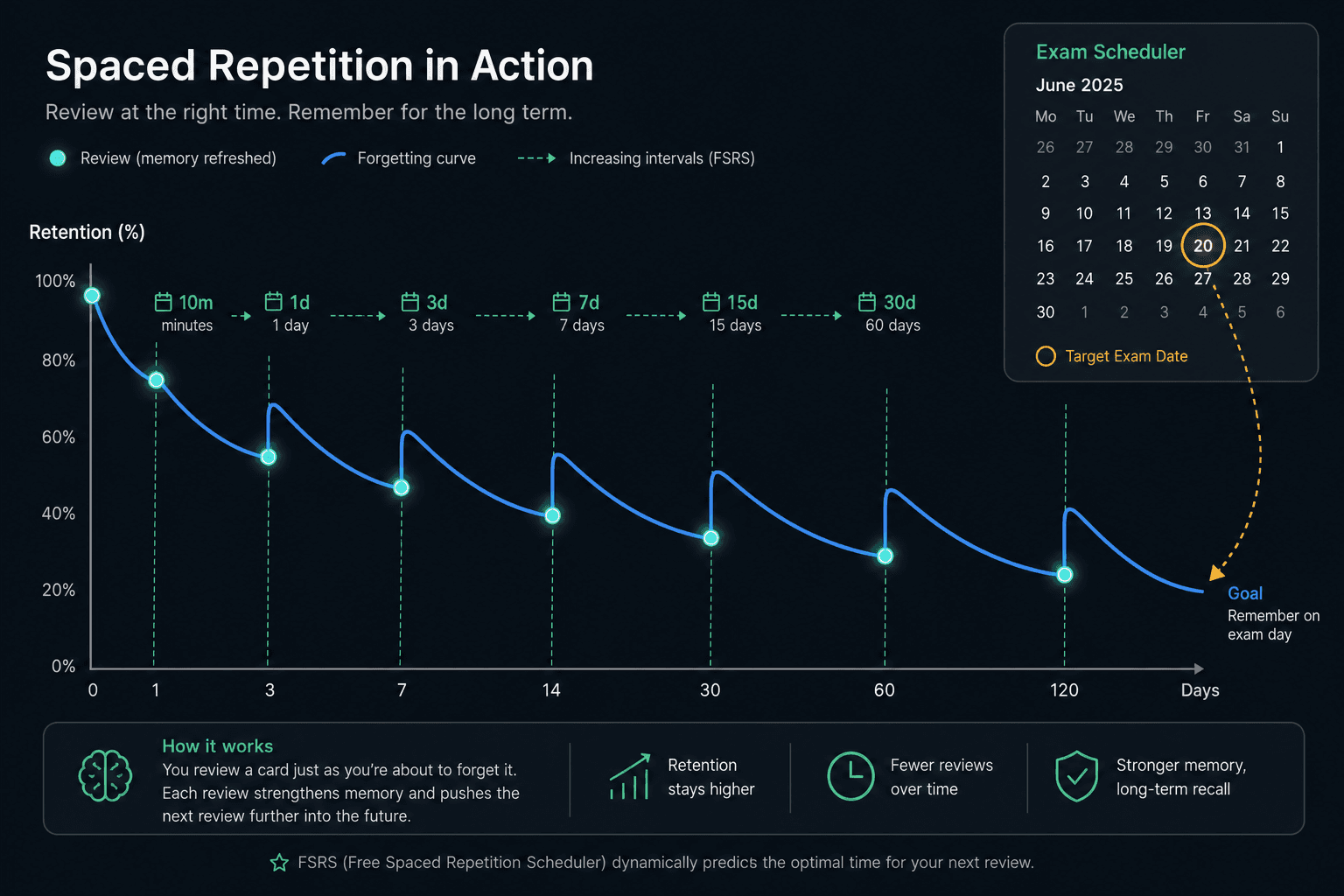
RemNote uses two named, selectable spaced repetition algorithms: FSRS and SM-2. FSRS is the default. According to RemNote's official feature page, FSRS can reduce review load by 20–30% compared to SM-2 by more accurately modeling how memory decays for each individual card. Students who want maximum efficiency on large card volumes should use FSRS and leave it as the default.
The system shows a card for review when it estimates there is approximately a 10% chance you have forgotten it. This threshold is intentional: reviewing too early wastes time on cards you still know; reviewing too late means you have already forgotten. The sweet spot — recalling with some effort — is where memory consolidation is most efficient.
Rating options after each card are: Forgot, Partially recalled, Recalled with effort, Easily recalled, and Skip. The help center describes "Recalled with effort" as the productive middle ground — the rating that signals genuine retrieval practice rather than passive recognition.
Multi-line cards run the SRS algorithm on each bullet independently. If you have a list of ten drug mechanisms, RemNote tracks each one separately — so a card you know well gets a long interval while one you keep forgetting stays in heavy rotation.
Spoiler protection automatically delays related cards when you review one from a group, preventing you from accidentally seeing the answer to a card you are about to be tested on.
The Exam Scheduler
The Exam Scheduler is RemNote's most distinctive SRS feature. You set an exam date and choose a study intensity (casual, regular, or intense), and RemNote automatically adjusts your daily review load so that your retention peaks on the day of the exam. As the exam approaches, the scheduler compresses review intervals to maximize what you retain at the critical moment.
This is a meaningful differentiator. Anki does not offer native exam-date-driven scheduling — students who want similar behavior in Anki need to configure it manually or use third-party add-ons. RemNote builds it into the core product.
AI Features by Tier
RemNote's AI capabilities are tiered by subscription level. The free plan includes a meaningful but limited allocation; serious AI users will need the Pro with AI plan. Here is how the tiers break down based on the current pricing page.
| Feature | Free | Pro | Pro with AI |
|---|---|---|---|
| AI credits per month | 100 (resets monthly) | 1,000 | 20,000 |
| AI card generation runs | 5 AI cards | 50 runs/month | Included in credits |
| AI flashcards from PDFs/PPTs | Limited | Limited | Yes — Learn PDF |
| AI quizzes and summaries | Limited | Limited | Yes — Learn PDF |
| AI tutor chat | Limited | Limited | Yes |
| AI grading | No | No | Yes |
| Lecture recorder | No | No | Yes |
| Image to text | No | No | Yes |
| Audio transcription | No | No | Yes |
| Scan to RemNote | No | No | Yes (added v1.25) |
Version 1.25 introduced AI Chat V2, an updated conversational AI interface for asking questions about your notes, and scan-to-RemNote for capturing physical documents. The Pro with AI plan's lecture recorder is particularly useful for students who attend live lectures and want to generate flashcards from audio after class.
Pricing
| Plan | Monthly billing | Annual billing | Key limits |
|---|---|---|---|
| Free | $0 | $0 | 3 PDFs, 5 image occlusion cards, 10 LaTeX cloze cards, 2 knowledge bases, 3 tables, 100 AI credits/month |
| Pro | $10/month | $8/month ($96/year) | Unlimited PDFs, image occlusion, tables and templates, Exam Scheduler, handwritten notes, 1,000 AI credits |
| Pro with AI | $20/month | $18/month ($216/year) | Everything in Pro plus 20,000 AI credits, Learn PDF, lecture recorder, AI grading, AI tutor chat, image to text, audio transcription |
| Lifetime | — | One-time fee (verify at remnote.com/pricing) | Equivalent to Pro or Pro with AI permanently |
Platforms and Offline Access
- Web — accessible from any browser, no installation required
- iOS — native app available; see Limitations section for reliability notes
- Android — native app available
- Windows — desktop app with offline-first architecture
- macOS — desktop app with offline-first architecture
RemNote uses an offline-first architecture, meaning the desktop and mobile apps function without an internet connection and sync when connectivity is restored. This is relevant for students who study in environments with unreliable Wi-Fi or who want to review flashcards during a commute.
Limitations
RemNote has real limitations that matter for specific student types. These are not minor inconveniences — for some users they are reasons to choose a different tool.
- iOS and iPad reliability. An April 2026 Reddit thread documented widespread freezing and crashing on the iPad app, with broad user agreement that the app was fundamentally unreliable. RemNote acknowledged the issue, apologized, and released a hotfix — but as of the time this profile was written, comprehensive post-hotfix user verdicts were still accumulating. Check current activity on r/RemNote before committing to RemNote as an iOS-primary user. The web and desktop versions do not have these reported issues.
- Learning curve. RemNote introduces concepts like Rem references, portals, and the outliner structure that take time to internalize. Expect 30–60 minutes to get a working setup, and longer to develop a consistent workflow. Students who need to start studying immediately without a setup investment will find this friction frustrating.
- Credit-gated AI. The free plan's 100 AI credits per month and the Pro plan's 1,000 credits are consumed quickly if you use AI features regularly. Students who want to generate flashcards from PDFs, use the lecture recorder, or run AI chat extensively need the Pro with AI plan at $18/month (billed annually).
- No native cross-document simultaneous quizzing. RemNote does not natively support pulling cards from multiple unrelated documents into a single mixed review session in the way some students expect. This is a workflow limitation for students who want to interleave cards across different subjects in one sitting.
- Smaller shared-deck community. Anki's AnKing deck contains over 30,000 medical cards maintained by a community of more than 100,000 students. RemNote has a growing community but no equivalent pre-built deck ecosystem. Students who depend on high-quality shared decks — particularly for MCAT or Step 1 — will find RemNote's community significantly smaller.
- Free-tier caps. The free plan limits users to 3 annotated PDFs, 5 image occlusion cards, 10 LaTeX cloze cards, 2 knowledge bases, and 3 tables. These caps are hit quickly by students in content-heavy programs.
Who RemNote Is Best For — and Who Should Look Elsewhere
Best For
- Medical and graduate students needing high-volume retention. The combination of FSRS, the Exam Scheduler, image occlusion, and PDF annotation makes RemNote well-suited for students managing thousands of cards across anatomy, pharmacology, pathology, and related fields — provided they use the web or desktop version.
- Serious university students who take detailed lecture notes. If your study workflow involves extensive note-taking that you then need to review, RemNote's inline card creation eliminates the friction of maintaining a separate flashcard tool.
- Anki users who want an integrated workflow. Full-fidelity Anki import (scheduler history, templates, LaTeX, tags) means switching costs are lower than they appear. Students who find Anki's note-taking absent and want everything in one place are a natural fit.
- Exam-date-driven learners. The Exam Scheduler is a genuine differentiator for students who think in terms of a specific test date and want the system to handle the scheduling math automatically.
- Language learners with grammar-heavy materials. The outliner structure suits grammar rule hierarchies, and the mix of cloze, Q&A, and list cards covers vocabulary, conjugations, and example sentences in one deck.
Avoid If
- You are iOS-primary. Until the post-hotfix reliability situation on iOS and iPad is clearly resolved, students who study primarily on iPhone or iPad are taking on meaningful risk. Verify current app stability before committing.
- You are a casual or short-term learner. If you need to cram for one exam and move on, the 30–60 minute setup investment and the learning curve for RemNote's concepts are not worth it. A simpler tool serves this use case better.
- You depend on large pre-built shared decks. If your study system relies on the AnKing deck or similar community-maintained resources with tens of thousands of high-quality cards, RemNote's deck community cannot match that. Anki remains the right tool for this workflow.
- You want Quizlet-style social features. RemNote is not designed for sharing sets with classmates, collaborative study, or public deck browsing. Students who use flashcards socially will find the tool poorly suited to that workflow.
- You want a tool that works without learning it first. RemNote rewards students who invest in understanding its system. If you want to open an app and start making cards in two minutes, look at Quizlet or a simpler flashcard tool instead.
Alternatives to Consider
If RemNote does not fit your situation, three alternatives cover most of the adjacent use cases.
- Anki. Free on desktop (one-time $25 on iOS), open-source, and the home of the AnKing deck and a 20-year shared-deck ecosystem. Anki gives you maximum SRS control and the largest community of pre-built medical and academic decks available anywhere. The trade-off is a steeper setup curve and no integrated note-taking — you write notes elsewhere and create cards separately. For medical students who rely on AnKing, Anki remains the stronger choice.
- Quizlet. Simple, fast, and social. Quizlet is the right tool for students who need to memorize a short list for a single exam, share sets with classmates, or study without any setup time. It does not offer serious spaced repetition, and its free tier has become more limited in recent years. It is not a RemNote replacement for high-volume retention — it solves a different problem.
- Notion + Anki as a combined workflow. Some students prefer to keep their notes in a flexible workspace (Notion, Obsidian) and their flashcards in Anki as a dedicated SRS tool. This gives you more flexibility in how you organize notes and full access to Anki's card types and shared decks. The cost is the absence of a unified system — you are maintaining two separate tools and manually bridging them.
Final Verdict
RemNote is the most complete all-in-one study platform available for serious, high-volume learners. The combination of outliner-based note-taking, FSRS spaced repetition, the Exam Scheduler, full-fidelity Anki import, and AI-generated study materials from PDFs and lectures is genuinely difficult to replicate by combining separate tools. For medical students, graduate students, and university students who take dense lecture notes and need a long-term retention system, it is the strongest single-tool option on the market.
The honest caveats are real, not minor. The iOS reliability situation as of April 2026 is unresolved — verify current app stability before committing if you study on iPhone or iPad. The learning curve requires a genuine upfront investment. Credit-gated AI means the most useful AI features sit behind the $18/month Pro with AI plan. And students who depend on large pre-built shared decks will not find an AnKing equivalent in RemNote's community.
For the right student type — someone who takes detailed notes, studies for high-stakes exams, and wants notes and flashcards in a single system — RemNote is worth the learning curve and the subscription cost. For everyone else, the alternatives above are more honest fits.
Comments
Join the discussion with an anonymous comment.