
OneNote vs. GoodNotes for Students: Which Note-Taking App Is Right for You?
A head-to-head comparison of Microsoft OneNote and GoodNotes 6 for college and high school students, covering pricing, handwriting quality, PDF annotation, AI features, and platform support — with a concrete best-for decision guide by student persona to help you choose the right tool before you commit.
Updated:
Quick Answer: Which App Should You Choose?
If you type most of your notes, study across Windows, Android, and web, or need a completely free solution — OneNote is your app. If you own an iPad, write by hand with an Apple Pencil, and annotate textbook PDFs regularly — GoodNotes is your app. These two tools are not competing for the same student. The rest of this comparison exists to help you confirm which category you belong to.
What Each App Is Built For
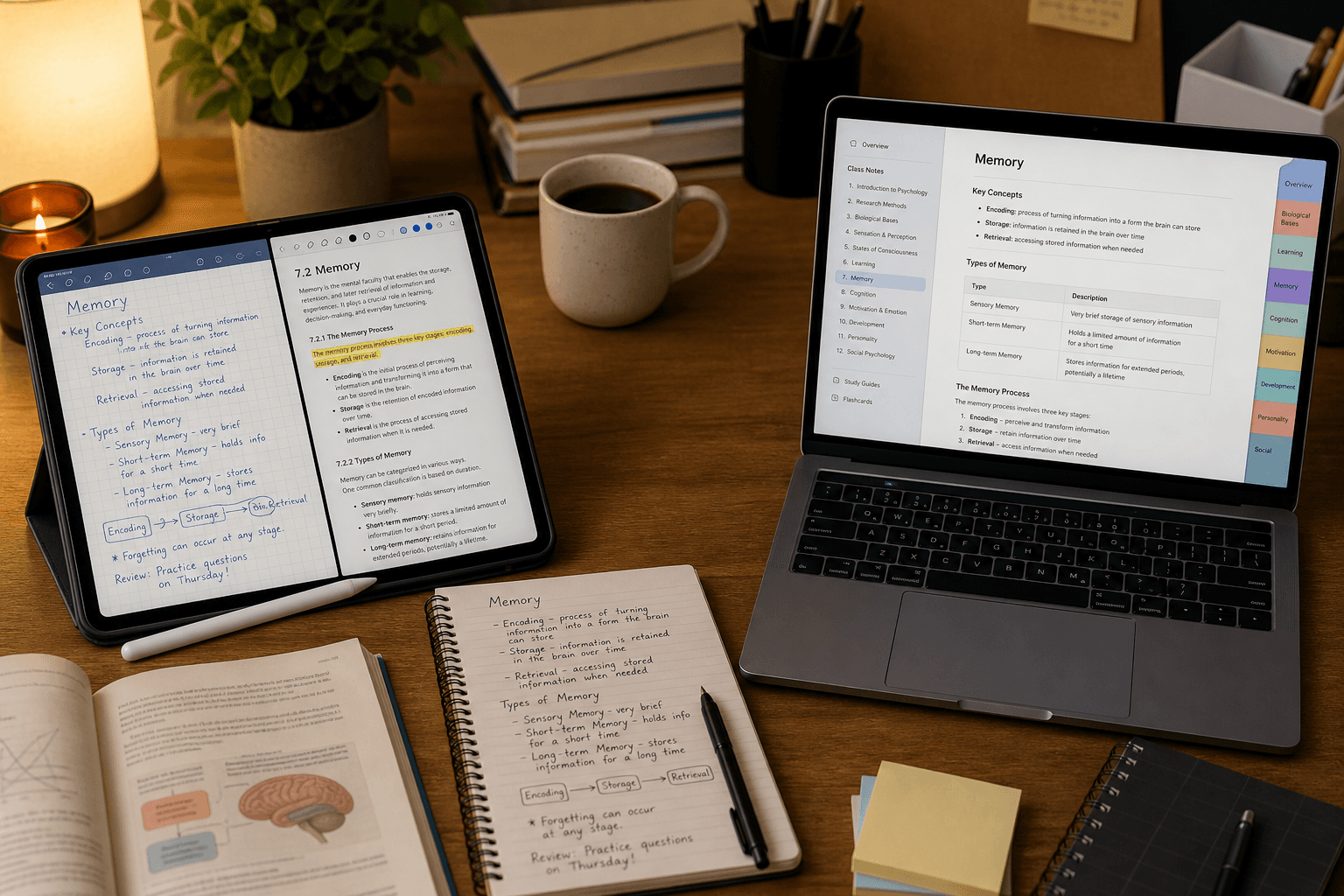
Microsoft OneNote was designed as a free, cross-platform digital notebook that fits naturally into the Microsoft 365 ecosystem. Its core experience centers on typed text organized into notebooks, sections, and pages — a structure familiar to anyone who has used Word or Teams. OneNote runs on every major platform with consistent features, stores notebooks via OneDrive, and requires no subscription for its core functionality. It is a workhorse note-taking tool built for breadth: it works everywhere, handles multiple content types, and costs nothing.
GoodNotes was built from the ground up as a pen-on-paper digital notebook for iPad. Its design philosophy treats handwriting as the primary input, not an afterthought. Every tool in the interface — fountain pen, highlighter, marker, ruler, tape — is oriented around the experience of writing and drawing with a stylus. The PDF annotation workflow is equally central: GoodNotes treats imported textbooks as first-class objects you interact with directly, not files you view alongside your notes. It is a premium, focused tool built for depth in a specific workflow.
Feature Comparison at a Glance
| Feature | OneNote | GoodNotes 6 |
|---|---|---|
| Price | Free (unlimited notebooks) | Free tier (3 files); Essential $11.99/yr; Pro $35.99/yr; Special Edition one-time $35.99 |
| Platforms | iOS, Android, Windows, macOS, Web — full parity | iOS, macOS (full); Windows, Android (reduced features) |
| Handwriting quality | Functional; not the primary design focus | Best-in-class on iPad with Apple Pencil |
| PDF annotation | Supported; secondary to notebook structure | Core use case; full drawing toolset built around PDFs |
| AI features | OCR search across all content types | Math Assist (Free+); Math Teach Me/Solve (Essential+); audio transcription (Essential+); Create mode, image generation (Pro or AI Pass) |
| Real-time collaboration | Yes — all plans, including free | Join only on Essential; host requires Pro ($35.99/yr) |
| OCR / search | Searches handwriting, typed text, images, embedded PDFs | Searches handwritten notes within GoodNotes documents |
| Organization | Notebooks → Sections → Pages; unlimited hierarchy | Notebooks → Folders → Pages; multi-colored folders |
| Templates | Built-in templates; custom page sizes | Extensive template library; customizable sizes and colors |
| Offline access | Yes — full offline with sync on reconnect | Yes — full offline with sync on reconnect |
| Handwriting-to-text conversion | Supported (varies by platform) | iOS only — not available on Windows or Android |
Pricing and 4-Year Cost of Ownership
For most students, the four-year cost of a note-taking app matters more than the monthly price. Here is how the math works out for a typical undergraduate.
| App / Plan | Annual Cost | 4-Year Total | Notes |
|---|---|---|---|
| OneNote | $0 | $0 | Full features, unlimited notebooks, 5GB OneDrive free; $0 additional for Microsoft 365 school accounts |
| GoodNotes Free | $0 | $0 | Limited to 3 files max, 5MB import limit, watermarked exports — not viable for full-time student use |
| GoodNotes Essential | $11.99/yr | ~$48 | Unlimited documents, Math Teach Me/Solve/Assist, unlimited audio transcription |
| GoodNotes Pro | $35.99/yr | ~$144 | Adds collaboration hosting, advanced AI Create mode, image generation, live meeting summaries |
| GoodNotes Special Edition | $35.99 once | $35.99 | One-time purchase, Apple devices only, includes Math Assist and basic cloud AI — no Pro AI features |
For most students who want GoodNotes without the full Pro feature set, the Special Edition one-time purchase or the Essential annual plan are the practical choices. The Essential plan at ~$48 over four years is a reasonable investment if GoodNotes is your primary note-taking tool. The Pro plan makes sense only if you need to host real-time collaboration sessions or rely on advanced AI features.
Handwriting and Apple Pencil Experience
GoodNotes' handwriting experience on iPad is genuinely best-in-class. The responsiveness of the Apple Pencil input, the variety of pen tools, and the suite of gesture-based shortcuts make it feel closer to writing on paper than any competing app. Key features that matter for daily student use include:
- Shape recognition — draw a rough circle or rectangle and GoodNotes snaps it to a clean geometric shape.
- Scribble to Erase — scribble over a mistake without switching to the eraser tool, keeping your writing flow uninterrupted.
- Circle to Lasso — draw a circle around any content to select and move it, faster than the standard lasso selection.
- Math equation conversion — write a handwritten equation and GoodNotes converts it to a clean typeset formula.
- Handwriting spellcheck — corrects misspelled words in your own handwriting style, running on-device without sending data externally.
- Handwriting-to-text conversion — converts handwritten notes to editable typed text (iOS only; not available on Windows or Android versions).
OneNote's handwriting support is functional and has improved steadily, but it is not the app's primary design focus. Ink input works across platforms including Windows Surface devices, but the toolset is more limited and the gesture shortcuts that make GoodNotes feel fluid are absent.
Why does handwriting quality matter beyond personal preference? A 2024 meta-analysis by Flanigan et al. in Educational Psychology Review covering 24 studies found that handwritten notes produced higher college course achievement (Hedges' g = 0.248) compared to typed notes, even though typing produces more notes by volume. A 2025 neuroimaging review published in PMC further found that handwriting activates a broader network of motor, sensory, and cognitive brain regions than typing. This is not an argument that everyone should handwrite — it is an argument that students who already prefer handwriting should use an app that makes that experience as good as possible, which is where GoodNotes has a clear advantage.
PDF Annotation Workflow
For students who import digital textbooks, lecture slides, or journal articles and annotate them directly, GoodNotes is the stronger choice. Its full drawing toolset — highlight, pen, marker, tape, ruler — is built around PDF use as a primary workflow. You can import a textbook, open it alongside a blank notebook page, and annotate both with the same set of tools without switching contexts.
OneNote handles PDF annotation, but it treats PDFs as embedded objects within its notebook structure rather than as standalone documents you interact with directly. You can insert a PDF printout and write over it, but the workflow is more cumbersome than GoodNotes' native PDF experience.
- GoodNotes: Import PDF → open full drawing toolset directly on the document → annotate with highlight, pen, or marker → search handwritten annotations by keyword.
- OneNote: Insert PDF as a printout → write over it with ink tools → annotations are embedded in the notebook page, not the PDF itself.
If annotating textbooks and reading materials is a central part of your study workflow, GoodNotes' PDF-first design is a meaningful practical advantage. If you primarily take notes during lectures and reference PDFs occasionally, OneNote's approach is adequate.
Cross-Platform Use and Platform Parity
This is where OneNote has a clear structural advantage. OneNote runs on iOS, Android, Windows, macOS, and the web with consistent features across all platforms. A note you create on your laptop looks and works the same on your phone and tablet. There is no feature gap between platforms.
GoodNotes is not Apple-only — it has Windows and Android apps — but those versions have meaningfully fewer features than the iOS and macOS versions. The most significant gap is handwriting-to-text conversion, which is iOS-only. The overall handwriting experience on Windows and Android is also reduced compared to the iPad version. If you switch between an iPad for class and a Windows laptop for writing papers, you will notice the difference.
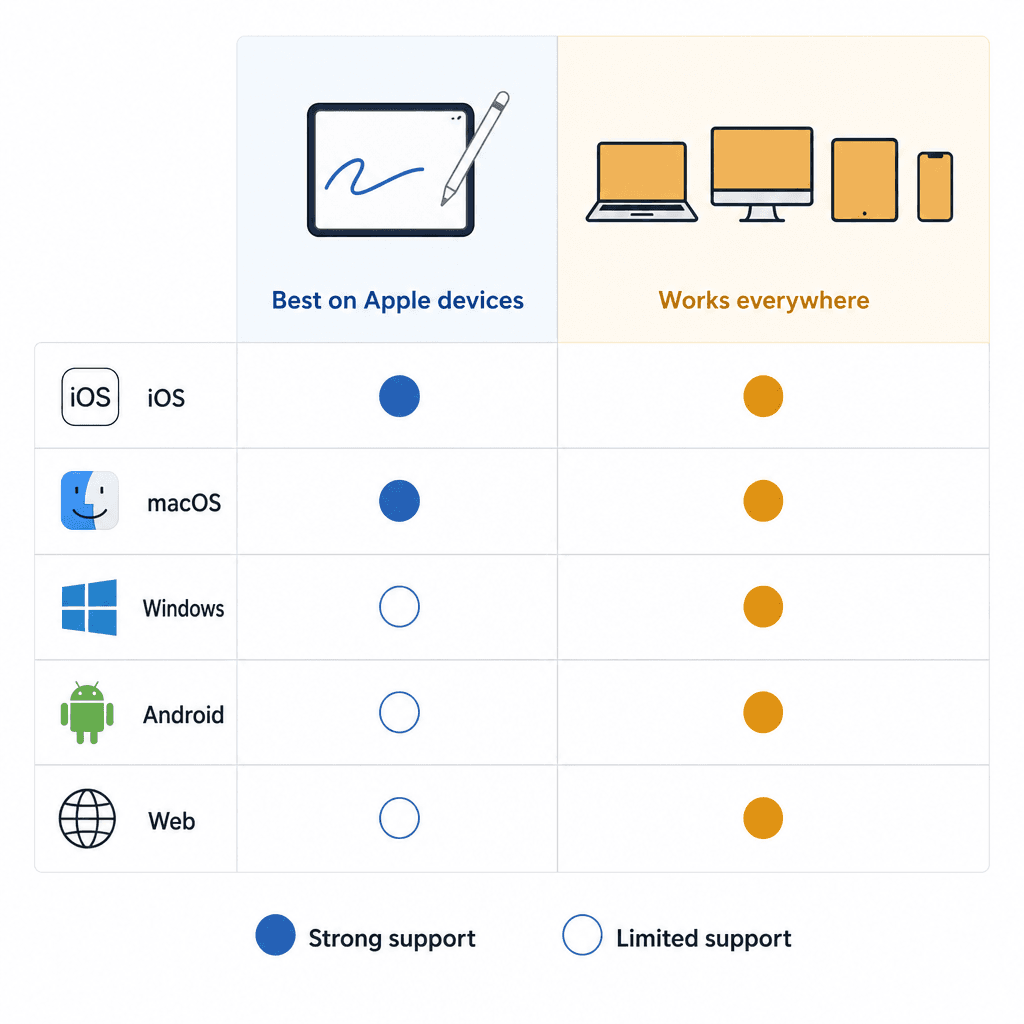
| Platform | OneNote | GoodNotes |
|---|---|---|
| iOS / iPadOS | Full support | Full support — best experience |
| macOS | Full support | Full support |
| Windows | Full support | Available — reduced features |
| Android | Full support | Available — reduced features |
| Web (browser) | Full support | Not available |
| Handwriting-to-text | Supported across platforms | iOS only |
AI Features: What Each App Offers (and What Plan You Need)
GoodNotes AI is not a single feature — it is a set of capabilities distributed across plan tiers. Understanding which features require which plan matters before you decide whether the AI component justifies the cost.
| AI Feature | GoodNotes Plan Required | Notes |
|---|---|---|
| Math Assist (step-by-step guidance) | Free and up | Available on all plans including the free tier |
| Math Teach Me and Math Solve | Essential ($11.99/yr) and up | Interactive math tutoring and equation solving |
| Handwriting spellcheck | Included in app | On-device; no data sent externally |
| Audio transcription (unlimited) | Essential and up | Free tier limited to 20-minute sessions |
| Advanced Create mode (AI notebook generation) | Pro ($35.99/yr) or AI Pass | Generates notebook content with AI |
| Image generation | Pro or AI Pass | AI-generated images within notebooks |
| Cloud transcription with live meeting summaries | Pro or AI Pass | Real-time meeting notes from audio |
| AI Pass add-on | Add-on to any plan | 6,300 monthly AI credits; full advanced AI access |
For most students, the Essential plan's Math Assist, Math Teach Me, and audio transcription features are the practically useful AI tools. The Pro-tier Create mode and image generation are more relevant for power users than for typical student note-taking workflows.
OneNote's AI advantage is different in character: its OCR engine searches across handwritten notes, typed text, images, and embedded PDFs simultaneously across all notebooks. If you have three years of notes and need to find a specific concept you wrote down in a lecture, OneNote's cross-content search is a meaningful practical tool. It does not generate content or assist with math, but for retrieval and organization it is genuinely useful — and it is free on all plans.
Collaboration: Working on Notes with Others
OneNote supports real-time collaborative notebook editing on all plans, including the free tier. Multiple students can edit the same notebook simultaneously, with editor and viewer access controls built in. This works natively without any additional cost or configuration — it is a core feature, not a premium add-on.
GoodNotes does support real-time collaboration, but the plan requirements matter. On the Essential plan, you can join a collaborative document that someone else hosts, but you cannot initiate or host a shared session yourself. Hosting real-time collaboration requires the Pro plan at $35.99 per year. If your study group needs to collaboratively annotate a shared document, at least one person needs a Pro subscription to set it up.
Best For: Decision Guide by Student Persona
The right app depends on your device, workflow, and budget — not on which app has more features. Use the guide below to identify your situation.
| Student Type | Recommended App | Reason |
|---|---|---|
| Budget student ($0 budget) | OneNote | Fully free with no meaningful limitations for most student workflows |
| iPad handwriter (Apple Pencil user) | GoodNotes | Best-in-class handwriting responsiveness, gesture shortcuts, and pen tools |
| Windows or Android primary user | OneNote | Full feature parity on Windows and Android; GoodNotes' non-Apple apps are feature-reduced |
| Typed-note taker | OneNote | Text editor is the primary interface; superior cross-platform sync and organization |
| Textbook-heavy annotator | GoodNotes | PDF annotation is a core design priority with a full drawing toolset built around it |
| Group-project collaborator | OneNote (or GoodNotes Pro) | OneNote collaboration is free on all plans; GoodNotes requires Pro to host sessions |
| STEM student (math-heavy) | GoodNotes Essential | Math equation conversion, Math Teach Me, and Math Solve are strong differentiators for math-intensive coursework |
| Microsoft 365 school account holder | OneNote | Already included in your school account at no additional cost |
- Budget student: OneNote. No subscription required, no file limits, no watermarks. If your school provides Microsoft 365, you already have it.
- iPad handwriter: GoodNotes. The pen experience, gesture shortcuts, and handwriting tools are meaningfully better than any cross-platform competitor.
- Windows or Android user: OneNote. GoodNotes' non-Apple apps exist but are feature-reduced; handwriting-to-text conversion is iOS-only.
- Typed-note taker: OneNote. GoodNotes is built around pen input; its text editor is secondary. OneNote's typing experience, search, and organization are stronger.
- Textbook-heavy annotator: GoodNotes. PDF annotation is a core use case, not an add-on. The full drawing toolset works directly on imported PDFs.
- Group-project collaborator: OneNote for most students. If you already pay for GoodNotes Pro, collaborative hosting is included — but do not upgrade to Pro solely for collaboration.
- STEM student: GoodNotes Essential if you are iPad-based (math equation conversion and Math Teach Me are strong tools). OneNote if you need cross-platform access to your math notes.
Final Verdict
OneNote wins on cost, platform breadth, and typed-note organization. It is free, works everywhere with consistent features, supports real-time collaboration on all plans, and its OCR search across all content types is a practical advantage for students building large note archives. For any student who does not own an iPad or who types the majority of their notes, OneNote is the straightforward choice.
GoodNotes wins on handwriting fidelity, PDF annotation depth, and the iPad pen-paper experience. For students who handwrite notes with an Apple Pencil, import and annotate textbook PDFs regularly, or study STEM subjects where equation input matters, GoodNotes' focused design pays off in daily use. The Essential plan at $11.99 per year is a reasonable cost for a tool that is genuinely better at these specific tasks than any free alternative.
Some students use both: GoodNotes for lecture notes and textbook annotation on iPad, OneNote for typed reading notes and research synthesis on a laptop. That combination is practical if your workflow genuinely spans both use cases. But for most students, one app covers the majority of their needs — and the decision guide above should tell you which one that is.
Individual Tool Profiles
Related Comparisons
- Quizlet vs Knowt: Which Free Flashcard App Is Better for Students?
A head-to-head comparison of Quizlet and Knowt for budget-conscious students, covering what each platform actually offers for free in 2026, how their paid plans compare, and which tool fits different student profiles — from AP exam preppers to language learners.
- Anki vs. Quizlet: Feature Matrix, Algorithm Explained, and Decision Guide for Students
A structured comparison of Anki and Quizlet for 2026 — covering the FSRS algorithm vs. session-based review, current pricing tiers and free-tier limits, AI card creation, and a five-persona decision guide so you can match the right tool to your actual study situation.
- Notion vs. Obsidian for Students: Which Note-Taking App Fits Your Academic Workflow?
A structured, student-centered comparison of Notion and Obsidian covering pricing, offline access, collaboration, study-specific tools, and AI features — with clear recommendations by student type to help you choose the right tool for your academic workflow.
Comments
Join the discussion with an anonymous comment.