
Notion vs. Obsidian for Students: Which Note-Taking App Fits Your Academic Workflow?
A structured, student-centered comparison of Notion and Obsidian covering pricing, offline access, collaboration, study-specific tools, and AI features — with clear recommendations by student type to help you choose the right tool for your academic workflow.
Updated:
Quick Verdict: Notion vs. Obsidian at a Glance
If you're already leaning toward one tool and just need a sanity check, this table covers the seven categories that matter most for students. No single tool wins across the board — the right choice depends on how you actually study.

| Category | Notion | Obsidian | Edge |
|---|---|---|---|
| Getting started | Drag-and-drop blocks, no setup required | Markdown syntax, vault and plugin setup needed | Notion |
| Note organization | Databases, tables, kanban, calendar views | Bidirectional links, backlinks, graph view | Depends on use case |
| Real-time collaboration | Multi-user editing, comments, @mentions | New in 1.8: E2E encrypted real-time sync | Notion |
| Offline access | Requires internet for most features | Fully offline by default, local Markdown files | Obsidian |
| Study-specific tools | No native spaced repetition or PDF annotation | SR plugin, PDF++ plugin, ZotLit for Zotero | Obsidian |
| AI features | Notion AI: writing, summarizing, Q&A on pages | Third-party plugins (e.g., Smart Connections) | Notion (native) |
| Pricing for students | Free Education Plus plan (requires .edu verification) | Free for all personal/educational use, no gates | Obsidian (simpler) |
What Each Tool Is (And What It's Built For)
Notion and Obsidian are both note-taking tools, but they were built from completely different starting assumptions about how people think and work. Understanding that difference is the fastest way to figure out which one belongs in your academic life.
Notion is a cloud-first, block-based workspace. Every piece of content — a paragraph, a to-do list, a table, an image — is a block you can drag, nest, and combine into pages. Notion is designed around structure and sharing: you can build a course dashboard with linked databases for assignments, readings, and deadlines, then share it with a study group in seconds. The product is built for teams as much as individuals, and that shows in how it handles collaboration.
Obsidian is a local-first, Markdown-based knowledge graph. Your notes are plain text files stored on your own device — no proprietary format, no cloud dependency. The core idea is that knowledge grows through connections: every note can link to any other note, and over time you build a personal web of ideas that mirrors how your brain actually organizes information. Obsidian is designed for solo deep learning, not real-time collaboration.
- Notion's design priority: structured organization, team collaboration, and accessible onboarding for anyone.
- Obsidian's design priority: long-term personal knowledge building, data ownership, and deep academic research workflows.
- These aren't just feature differences — they reflect opposite philosophies about where your data lives and who it's for.
Learning Curve and Getting Started
Notion is genuinely accessible from day one. You open a new page, start typing, and use slash commands to insert blocks — tables, checklists, headers, embeds. The interface is visual and forgiving. Most students can build a functional course notes page within the first hour without reading any documentation.
Obsidian has a real learning curve, and it's worth being honest about that rather than dismissing it. Before you take a single note, you need to make decisions: Where will your vault live? Which plugins do you need? How will you name and link your files? If you've never used Markdown, you'll need to learn that too — though the basics (bold, headers, bullet points) take about 20 minutes to pick up.
The honest calibration: Notion's low floor makes it the right default for students who need immediate productivity. Obsidian's higher floor is worth clearing for students who plan to use the tool seriously for more than one semester — the investment pays back through a more powerful long-term system.
Note Organization: Databases and Pages vs. Linked Notes and Graph View
This is where the two tools diverge most sharply in practice — and where your academic context matters most.
Notion organizes information through databases and nested pages. A course can be a database with properties for due dates, status, priority, and linked readings. You can view the same database as a table, a kanban board, a calendar, or a filtered list. This structure works extremely well for managing the operational side of being a student: tracking assignments across multiple courses, organizing a group project, building a semester planner. The visual clarity of a Notion dashboard is hard to beat when you need to see everything at once.
Obsidian organizes information through connections between notes. When you write about photosynthesis in your biology notes, you can link directly to your chemistry notes on electron transport chains. Over time, these links accumulate into a graph — a visual map of how your knowledge connects. The graph view is not just aesthetic; it reveals conceptual gaps and relationships that a folder structure would hide.
- Use Notion's database structure for: assignment tracking, reading lists with status tags, group project wikis, semester-level planning.
- Use Obsidian's linked notes for: connecting concepts across courses, building a permanent notes archive across semesters, thesis research where ideas compound over months.
- Notion's nested pages work well for class notes but don't naturally surface relationships between topics from different courses.
- Obsidian's backlinks show you every note that references a concept — useful for studying, less useful for managing deadlines.
Collaboration and Sharing for Group Projects
For most group project scenarios, Notion is the clearer choice. Multiple people can edit the same page simultaneously, leave comments, tag each other with @mentions, and divide work across a shared database. If your study group needs a shared space where everyone can contribute notes, track tasks, and see each other's changes in real time, Notion handles this without any friction.
Obsidian's collaboration story changed meaningfully in 2026 with the release of version 1.8, which introduced end-to-end encrypted real-time collaboration. This is a genuine development worth acknowledging — Obsidian is no longer a solo-only tool.
Even with Obsidian's new collaboration capability, there are practical gaps for typical student group work. Notion's permission model (viewer, commenter, editor, full access) is mature and intuitive for adding group members. Its comment threads, inline mentions, and page history are features that student teams actually use when coordinating a shared document. Obsidian's collaboration is newer and likely less polished for multi-person workflows. For a high-stakes group project this semester, Notion remains the safer bet.
- Notion: real-time co-editing, comments, @mentions, granular permissions, page history — all mature and reliable.
- Obsidian 1.8: new E2E encrypted real-time collaboration — promising but verify current state before committing to it for group work.
- Notion's Education Plus plan allows up to 100 guest collaborators — more than enough for any student project.
Offline Access and Performance on Campus
Campus WiFi is unreliable. Library networks get congested during finals. Commuters study on trains and buses. These are real constraints that matter when you're choosing a note-taking tool you'll use every day.
Obsidian works fully offline by default. All your notes are plain Markdown files on your device. You can open, edit, search, and link notes with no internet connection at all. There's nothing to load, no sync delay, no spinner. On a slow campus network, Obsidian performs identically to being on gigabit fiber.
Notion requires an internet connection for most features. Pages load from Notion's servers, and on a slow or congested network, you'll notice the lag. Offline access exists in a limited form — recently viewed pages may be cached — but it's not reliable enough to count on for serious study sessions without connectivity.
Study-Specific Tools: Spaced Repetition, PDF Annotation, and Research Integrations
This section is where Obsidian pulls significantly ahead for serious academic users — particularly STEM students and anyone doing research-intensive work.
Obsidian's plugin ecosystem adds capabilities that Notion simply doesn't have natively. Three plugins are especially relevant for students:
- Spaced Repetition plugin: Turns your existing notes into flashcard review sessions using a spaced repetition algorithm. You write your notes normally, mark certain lines or blocks as review cards, and the plugin schedules them for you. This means your study material and your review system live in the same place — no exporting to Anki, no duplication.
- PDF++ plugin: Enables deep annotation of academic PDFs directly within Obsidian, with the ability to link highlighted passages to specific notes. For students who read journal articles, textbook chapters, or research papers, this creates a direct connection between source material and your own notes.
- ZotLit plugin: Integrates directly with Zotero, the academic reference manager. You can pull citations, annotations, and metadata from your Zotero library into Obsidian notes automatically. For thesis and dissertation work, this is a significant workflow advantage.
Notion has no native equivalent for any of these three capabilities. You can embed PDFs and view them inside Notion, but annotation is limited and not linked to your notes. There's no spaced repetition feature. Citation management requires copying references manually or using a third-party integration that doesn't approach ZotLit's depth.
For students whose academic workflow involves reading primary sources, managing citations, and wanting their review system embedded in their notes, Obsidian's plugin ecosystem is a genuine advantage that Notion can't match today.
AI Features in 2026
Both tools have AI capabilities in 2026, but they work differently and serve different purposes.
Notion AI is built directly into the product and available across all plan types (with usage limits on free plans). It can summarize a page, generate a draft from a prompt, answer questions about content in your workspace, and help rewrite or improve text. For students, the most useful application is asking Notion AI to summarize a long set of notes or generate a study guide from a course page. It works without leaving the app.
Obsidian doesn't have built-in AI. Instead, it relies on community plugins — most notably Smart Connections, which lets you query your notes using an AI model and surfaces semantically related notes as you write. Other plugins connect to external APIs (OpenAI, Anthropic) for in-note AI assistance. This approach gives power users more flexibility but requires setup and, in most cases, an external API subscription.
| AI Feature | Notion | Obsidian |
|---|---|---|
| Native AI integration | Yes — built in | No — plugin-based only |
| Summarize notes | Yes, natively | Via Smart Connections or similar plugin |
| Q&A on your content | Yes — asks across your workspace | Via plugin + external API |
| AI writing assistance | Yes — inline in any page | Via plugin + external API |
| Cost | Included with Notion AI add-on (check current pricing) | Plugin is free; AI model API costs extra |
| Setup required | None | Plugin installation + API key configuration |
For students who want AI assistance without setup overhead, Notion's native integration is the practical choice. For students who want more control over which AI model processes their notes and prefer to keep sensitive academic content off third-party servers, Obsidian's plugin approach — while more complex — offers that flexibility.
Pricing for Students: What You Actually Pay
These two tools have fundamentally different free-tier structures, and it's worth being precise about what each one actually offers students.
Obsidian is free for all personal and educational use with no feature gates. The core app — including all local features, the plugin ecosystem, and the graph view — costs nothing. The only paid add-ons are Obsidian Sync (for encrypted cross-device sync with version history) and Obsidian Publish (for publishing your notes as a website). Both are optional. A student can use Obsidian for four years of undergraduate study without paying a cent, using free sync alternatives like iCloud or Google Drive.
Notion's situation is more nuanced. The standard free plan has block limits that make it impractical for heavy note-taking. However, Notion offers an Education Plus plan that is free for students at WHED-recognized institutions with a verified .edu email address. This plan includes unlimited blocks, unlimited file uploads, and up to 100 guest collaborators — essentially the full Notion experience at no cost.
| Plan detail | Notion (Education Plus) | Obsidian (Free) |
|---|---|---|
| Cost | Free with verified .edu email | Free, no verification needed |
| Feature gates | None on Education Plus | None on core app |
| Blocks / notes limit | Unlimited | Unlimited |
| File uploads | Unlimited | Stored locally, no limit |
| Collaboration | Up to 100 guests | New in 1.8 (verify current scope) |
| Sync across devices | Included (cloud-based) | Free via iCloud/Drive or paid Obsidian Sync |
| Data format | Proprietary (export available) | Plain Markdown files you own |
Which Tool Fits Your Student Situation
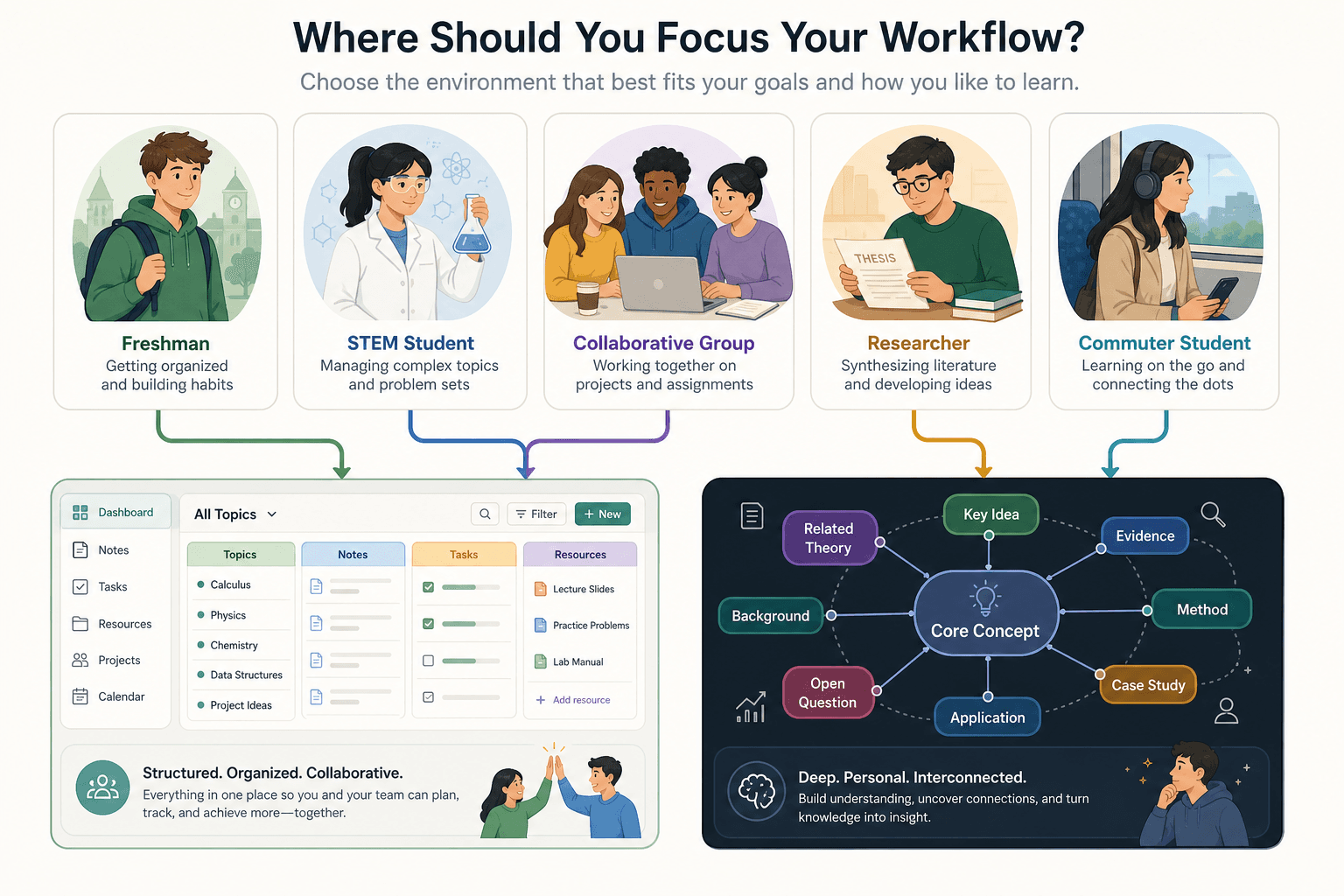
Rather than a single winner, here's a scenario-by-scenario breakdown for the five student types where this decision comes up most often.
- Freshman needing immediate productivity: Use Notion. You'll be productive from day one, the interface is intuitive, and the Education Plus plan is free. You can always add Obsidian later once you know how you actually study.
- STEM or research-track student connecting concepts across courses: Use Obsidian. The bidirectional linking and graph view are built for exactly this — connecting ideas from organic chemistry to biochemistry to pharmacology, or tracking how a theoretical framework appears across multiple papers. The spaced repetition plugin also integrates review directly into your notes.
- Group-project-heavy student: Use Notion. Real-time collaboration, shared databases, and comment threads are where Notion is unambiguously stronger. Your group members can join without any setup friction.
- Thesis or dissertation researcher: Use Obsidian. The ZotLit plugin's Zotero integration, PDF++ annotation, and long-term knowledge graph are purpose-built for research that spans years and requires connecting dozens of sources. Notion's citation management can't compete here.
- Commuter or offline-dependent student: Use Obsidian. Full offline access is not a workaround — it's the default. Your notes are always available, always fast, regardless of network conditions.
Full Feature Comparison Matrix
| Feature | Notion | Obsidian |
|---|---|---|
| Note organization model | Databases, nested pages, multiple views | Bidirectional links, backlinks, graph view |
| Learning curve | Low — accessible from day one | Moderate — Markdown + plugin setup required |
| Real-time collaboration | Mature: multi-user editing, comments, @mentions | New in v1.8: E2E encrypted (verify current state) |
| Offline access | Limited — requires internet for most features | Full offline by default — all files stored locally |
| Spaced repetition | None native | Plugin available (SR algorithm-based) |
| PDF annotation | Basic embed and view only | PDF++ plugin: deep annotation with note linking |
| Zotero integration | Manual or limited third-party | ZotLit plugin: direct, automatic integration |
| AI features | Notion AI: native, no setup | Plugin-based: Smart Connections + external API |
| Data format | Proprietary blocks (export available, lossy for DBs) | Plain Markdown files — fully portable, you own them |
| Data portability | Moderate — export works for pages, complex for DBs | High — standard Markdown, works in any text editor |
| Pricing (students) | Free Education Plus with .edu verification (WHED) | Free for all educational use, no verification needed |
| Sync across devices | Included via Notion cloud | Free via iCloud/Drive/Syncthing; paid Obsidian Sync optional |
| Plugin ecosystem | Limited official integrations | Large community plugin library |
| Mobile app | Yes — iOS and Android, full-featured | Yes — iOS and Android, improving rapidly |
| Long-term vendor risk | Moderate — proprietary format, company-dependent | Low — plain files survive any app change |
Can You Use Both? The Hybrid Approach
Using both tools is increasingly common among students who have tried each one seriously — and it's a legitimate strategy, not an indecisive one. The key is using each tool for what it's actually better at, rather than duplicating your workflow across two systems.
The hybrid approach that works: Notion for team-facing and structured operational work, Obsidian for personal deep-learning and long-term knowledge building.
- Notion handles: shared group project databases, assignment trackers with due dates and status, course wikis your study group edits together, semester-level planning dashboards.
- Obsidian handles: personal lecture notes with concept links, spaced repetition review, PDF annotation of research papers, Zotero-integrated thesis notes, the long-term knowledge graph that persists across semesters.
- The overlap to avoid: don't take the same class notes in both apps. Pick one for daily note-taking and use the other only for its specific strengths.
- When the hybrid creates overhead: if you're a first-year student still figuring out your workflow, two tools will slow you down more than help. Start with one — Notion if you need collaboration, Obsidian if you're tech-comfortable and studying solo-heavy subjects.
The hybrid approach makes the most sense for upper-division or graduate students who have clear, stable workflows and know exactly which tool serves each context. For students still establishing study habits, one tool done well beats two tools done partially.
Frequently Asked Questions
Is Obsidian too technical for non-developers?
Not necessarily, but it does require comfort with a text-based interface and some initial configuration. Students who use apps like Notion, Google Docs, or Word exclusively may find the Markdown syntax and plugin setup unfamiliar. That said, the core Markdown syntax used in 90% of notes (bold, headers, bullets, links) takes under an hour to learn. Non-developers who are willing to spend a few hours on setup have used Obsidian successfully for years. If you're not willing to invest that setup time, Notion is the better starting point.
Is Notion's free plan truly free for students?
The Education Plus plan is free, but it requires a verified .edu email from a WHED-recognized institution. The standard free plan has block limits that make it impractical for serious note-taking. If your institution qualifies, you get the full Notion experience at no cost. If your .edu email doesn't qualify, you're on the limited free tier. Check your eligibility at Notion's education page before assuming.
Can you migrate from Notion to Obsidian (or vice versa)?
Moving from Obsidian to Notion is straightforward — Markdown files import cleanly into Notion pages. Moving from Notion to Obsidian is more complicated: simple pages export as Markdown reasonably well, but complex databases lose their structure in the export. If you think you might switch later, keeping your most important content in simple Notion pages (not deeply nested databases) makes migration easier. This is also a reason to consider Obsidian's data portability advantage if you're concerned about long-term access to your notes.
Is Obsidian's new collaboration feature good enough for group work?
It's a meaningful step forward, but it's newer and less proven than Notion's collaboration tools. For a low-stakes study group where everyone already uses Obsidian, it may work well. For a graded group project where you need reliable real-time editing, shared permissions, and comment threads, Notion is the more dependable choice until Obsidian's collaboration feature has a longer track record. Verify the current state of the feature at obsidian.md before committing to it for anything high-stakes.
What happens to your Notion notes if you stop being a student?
Your Education Plus plan ends when you lose your .edu email access. You'll be downgraded to the free plan (with its block limits) unless you upgrade to a paid personal plan. This is worth factoring in if you're building a long-term knowledge base in Notion — you may eventually pay for continued access to your notes in their full form. Obsidian's notes are plain files you own regardless of any subscription status.
Individual Tool Profiles
Related Comparisons
- Anki vs. Quizlet: Which Flashcard App Is Right for You?
Anki and Quizlet take fundamentally different approaches to flashcard learning — one built for long-term retention through true spaced repetition, the other for accessible, low-friction study. This comparison breaks down their algorithms, pricing, study modes, and honest limitations so you can choose the right tool for your situation.
- Quizlet vs Knowt: Which Free Flashcard App Is Better for Students?
A head-to-head comparison of Quizlet and Knowt for budget-conscious students, covering what each platform actually offers for free in 2026, how their paid plans compare, and which tool fits different student profiles — from AP exam preppers to language learners.
Comments
Join the discussion with an anonymous comment.