
Anki vs. Quizlet: Which Flashcard App Is Right for You?
Anki and Quizlet take fundamentally different approaches to flashcard learning — one built for long-term retention through true spaced repetition, the other for accessible, low-friction study. This comparison breaks down their algorithms, pricing, study modes, and honest limitations so you can choose the right tool for your situation.
Updated:

Quick Verdict: Which Tool Fits Your Situation
- Medical, dental, or law students: Use Anki. The SRS algorithm is built for the volume and retention depth these exams require.
- Language learners building large vocabulary sets: Use Anki. Cross-day scheduling and community decks for Mandarin, Japanese kanji, Spanish, and others are significantly stronger.
- High school students or casual studiers: Use Quizlet. Lower setup friction, a massive shared set library, and game-based modes make it easier to start and stay consistent.
- Study groups and collaborative learners: Use Quizlet. Sharing sets and studying together is a core feature; Anki has no meaningful collaboration layer.
- Students on a tight budget: Use Anki. It is free on desktop and Android. The only cost is a one-time $24.99 iOS purchase if you need it on iPhone — no subscription ever.
- Short-term exam prep (weeks, not months): Either tool works, but Quizlet's free tier and ready-made sets give you a faster start. Anki's scheduling advantage matters less over a short window.
Feature Comparison at a Glance
| Feature | Anki | Quizlet |
|---|---|---|
| Spaced repetition algorithm | True multi-session SRS (FSRS or SM-2) — schedules reviews across days and weeks based on your personal forgetting curve | Session-based Learn mode only — resets each session, no cross-day scheduling (Long-Term Learning mode removed in 2020) |
| Pricing — desktop/web | Free | Free tier (limited); Plus ~$35.99/year; Plus Unlimited ~$44.99/year |
| Pricing — mobile | Free on Android (AnkiDroid); one-time $24.99 iOS purchase | Free app; Plus subscription required for full feature access |
| 2-year cost estimate | $0 (desktop/Android) to $25 (iOS) | $72–$90+ depending on plan and platform |
| Ease of setup | Moderate to high learning curve; manual card creation or deck import required | Very low; create a set in minutes or find one instantly from 800M+ shared sets |
| Study modes | Card review, cloze deletion, image occlusion (with add-on) | Flashcards, Learn, Test, Match, Gravity, Blast (gamified modes) |
| AI features | None built-in; third-party add-ons available | AI flashcard generation from text or notes (Plus); AI explanations |
| Offline access | Full offline support on all platforms | Limited offline on free tier; Plus required for reliable offline |
| Customization depth | Very high — card templates, add-ons, custom scheduling parameters, FSRS tuning | Low — limited to basic card formatting and set organization |
| Platform availability | Windows, macOS, Linux, iOS, Android, Web (AnkiWeb for sync) | Web, iOS, Android |
| Collaboration / sharing | Not supported natively | Core feature — easy set sharing, class folders, live study sessions |
| Pre-made deck library | Smaller but specialized — strong in medicine, languages, and professional exams (AnkiWeb shared decks) | Massive — 800M+ user-created sets across all subjects |
The Core Difference: How Each App Actually Schedules Your Learning
The most important difference between Anki and Quizlet is not the interface or the price — it is what happens between study sessions.
Anki uses a genuine spaced repetition system. When you rate a card after reviewing it, Anki calculates when you are most likely to forget that specific piece of information — your personal forgetting curve for that card — and schedules it to reappear just before that point. Review a card confidently today, and Anki might not show it again for four days. Review it again confidently, and the next interval might be two weeks. This cross-session scheduling is what makes SRS meaningfully different from ordinary flashcard practice.
Anki currently defaults to the FSRS algorithm (Free Spaced Repetition Scheduler), a modern improvement over the older SM-2 algorithm. FSRS personalizes intervals more precisely based on your actual review history. Both FSRS and SM-2 are true multi-session systems — the scheduling persists across days, weeks, and months.
Quizlet's Learn mode works differently. It adapts within a single session — showing you cards you missed more often during that study period — but it does not carry scheduling information forward to your next session. When you open Quizlet tomorrow, it does not know which cards you are about to forget. You start fresh.
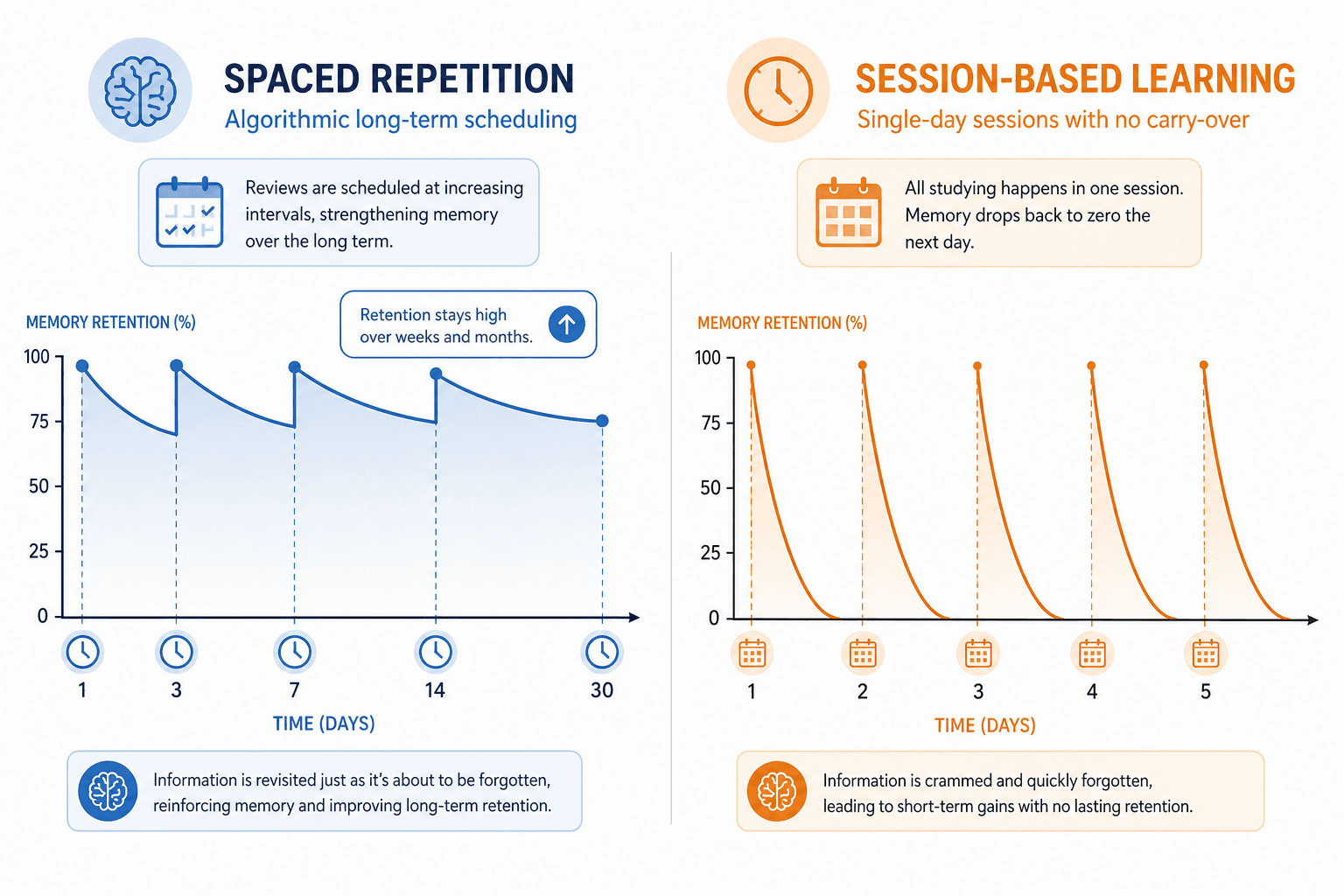
The practical consequence: with Anki, a card you learn today is still being managed three months from now, appearing at exactly the intervals your memory needs. With Quizlet, you are responsible for deciding when to review — and the app has no memory of how well you knew something last week.
Research on spaced practice supports the value of this approach. Dunlosky et al. (2013), reviewing ten common study strategies in Psychological Science in the Public Interest, rated distributed practice — the same principle underlying SRS — as one of the highest-utility techniques of the ten reviewed. The Ebbinghaus forgetting curve research, while over a century old, provides the foundational model that SRS algorithms are designed to work against.
Pricing Breakdown: What You Actually Pay Over Two Years
Sticker price comparisons between Anki and Quizlet are often misleading because Anki's costs vary by platform and Quizlet's costs compound annually. Here is a more useful framing: what does each tool actually cost over two years of regular use?
| Platform / Scenario | Anki | Quizlet |
|---|---|---|
| Desktop (Windows/macOS/Linux) | Free | Free tier (limited features); Plus required for full access |
| Android | Free (AnkiDroid) | Free app; subscription for full features |
| iOS (iPhone/iPad) | One-time $24.99 purchase | Free app; subscription for full features |
| Web sync | Free (AnkiWeb) | Free tier available |
| 2-year cost — desktop/Android only | $0 | ~$72 (Plus) to ~$90 (Plus Unlimited) |
| 2-year cost — including iOS | ~$25 (one-time, no renewal) | ~$72–$90+ (annual subscription, renews each year) |
| Subscription required? | Never | Yes, for most meaningful study modes beyond basic flashcards |
The key point: Anki's iOS purchase is a one-time cost that does not renew. Quizlet's subscription renews annually. A student who uses Quizlet Plus for two years spends roughly three times more than a student who buys the Anki iOS app once — and the Anki user retains full functionality indefinitely after that purchase.
Who Should Use Anki
Anki's design philosophy is built around one goal: retaining a large volume of specific facts over a long period of time. That makes it the right tool for a specific type of learner.
- Medical and dental students. The USMLE Step 1, Step 2, and similar licensing exams require mastery of thousands of facts across anatomy, pharmacology, pathology, and clinical medicine. Anki's SRS handles this volume in a way no session-based tool can match. A cohort study by Lu et al. (Cureus, 2023) found that medical students who used Anki's spaced repetition consistently scored 6–13% higher on standardized exams compared to peers who did not — though this is correlational evidence, not a randomized controlled trial, and other study habits likely contributed.
- Law students. Bar exam preparation involves memorizing elements of law, exceptions, and procedural rules across multiple subjects. Anki's scheduling keeps this material active over the months-long prep period without requiring constant manual review decisions.
- Language learners building large vocabulary sets. Acquiring 2,000–10,000 vocabulary items in Mandarin, Japanese, Spanish, Russian, or Arabic is exactly the use case SRS was designed for. Community decks for these languages on AnkiWeb are extensive and well-maintained.
- Professional certification candidates. CPA, CFA, NCLEX, and similar exams involve large fact sets that need to stay active over months. Anki's scheduling prevents the forgetting that happens when you move on to new material.
- Students who want to own their data and customize their workflow. Anki is open-source. Your decks are local files. You can tune the FSRS algorithm, install add-ons, and export your data at any time. There is no vendor lock-in.
Who Should Use Quizlet
Quizlet's strengths are accessibility, breadth, and social learning. It is the right tool when those qualities matter more than retention depth.
- High school students. Most high school courses require learning material for a test that is weeks away, not months. Quizlet's session-based Learn mode and game-based study modes (Match, Gravity) are well-suited to this shorter time horizon and keep studying engaging.
- Study groups and collaborative learners. Quizlet makes it easy to share a set with a class, study together live, and build on each other's card sets. Anki has no equivalent collaboration layer.
- Students who need a fast start. With 800M+ user-created sets, there is almost certainly an existing Quizlet set for your topic. You can find it, open it, and be reviewing cards in under two minutes. Anki requires more upfront investment.
- Beginners who find Anki's setup discouraging. If the alternative to Quizlet is not studying at all, Quizlet wins. A tool you actually use consistently beats a theoretically superior tool you abandon after three days.
- Students who want AI-assisted card creation. Quizlet's Plus tier includes AI flashcard generation from pasted text or notes. Anki has no built-in AI features, though third-party add-ons exist.
Honest Limitations of Each Tool
Both tools have real downsides that comparison articles often understate. Understanding these before you commit saves you from switching tools mid-semester.
Anki's real limitations
- Review debt is a genuine psychological burden. If you miss two or three days of reviews, Anki's due card count can climb into the hundreds. Opening the app to a queue of 300+ cards is demotivating, and many students stop using Anki entirely because of this. The scheduling system works best when you review daily — which requires consistent discipline that not everyone can maintain.
- The initial setup curve is real. Creating effective cards, understanding card templates, configuring deck settings, and learning to rate cards accurately all take time. New users often make poor cards (too long, too vague) and then blame the tool when retention suffers.
- SRS can encourage rote memorization without understanding. Anki is very good at helping you recognize the answer to a specific prompt. It is less good at helping you understand why that answer is correct or how concepts connect. Students who over-rely on Anki without deeper study can pass recall tests while struggling with application questions.
- The default interface is dated. Anki's desktop UI has not kept pace with modern design standards. It is functional but not polished. Students accustomed to Quizlet's clean interface often find Anki's default look discouraging.
Quizlet's real limitations
- Paywall creep has made the free tier less useful. Features that were once free have moved behind Plus. If you are planning to use Quizlet as a free tool for serious daily study, verify which modes are still available on the free tier before committing — the answer may surprise you.
- No true cross-day spaced repetition. This is not a minor limitation — it is the fundamental reason Quizlet is not the right tool for high-volume, long-term learning. The session-based Learn mode is useful, but it does not replace what Anki's scheduling does.
- Limited customization for serious learners. Quizlet's card format is simple by design. You cannot create cloze deletion cards, image occlusion cards, or cards with complex formatting without workarounds. Students who need these features will hit a ceiling quickly.
- Shared set quality is inconsistent. The 800M+ set library includes a lot of low-quality, error-filled, or incomplete sets. Finding a reliable set for a specific course or exam requires vetting, and for high-stakes material, errors in community sets can be costly.
Can You Use Both? A Complementary Workflow
You do not have to choose permanently. Many students use both tools in a complementary workflow that takes advantage of each tool's strengths.
The practical approach: use Quizlet to find community-created sets quickly and do initial review of new material. Once you have identified which content is worth retaining long-term, export that material to Anki via CSV and let Anki's SRS manage it from there.
- Search Quizlet for an existing set on your topic. With 800M+ sets available, there is usually something usable.
- Use Quizlet's Learn mode or Flashcards mode to do an initial pass through the material and identify what you don't know.
- Export the set from Quizlet as a CSV file (available from the set's options menu).
- Import the CSV into Anki using File > Import, mapping the columns to Front and Back fields.
- Use Anki for all subsequent reviews of that material, letting the SRS algorithm schedule when you see each card again.
This workflow is especially useful for students who are starting a new subject and want the speed of Quizlet's shared library without giving up Anki's retention advantage for the long term.
Decision Checklist: Commit to Your Choice
Answer these questions honestly. Each answer maps to a clear recommendation.
| Question | If yes → consider | If no → consider |
|---|---|---|
| Are you studying this material for more than 2–3 months? | Anki | Either tool |
| Do you need to retain more than 500 individual facts? | Anki | Quizlet |
| Are you preparing for a high-stakes exam (MCAT, USMLE, bar exam, language proficiency)? | Anki | Quizlet |
| Can you commit to reviewing cards every day or near-daily? | Anki | Quizlet |
| Are you willing to spend 1–2 hours learning the tool before it becomes useful? | Anki | Quizlet |
| Do you need to study with classmates or share sets with a group? | Quizlet | Anki |
| Do you need to get started within the next 10 minutes? | Quizlet | Either |
| Is your budget $0 and you need iOS support? | Neither is free on iOS — Anki is $24.99 one-time; Quizlet requires a subscription for full use | — |
| Is your budget $0 and you only need desktop or Android? | Anki | — |
| Do you want AI to help generate your flashcards? | Quizlet (Plus) | Anki (free, manual) |
Frequently Asked Questions
Is Anki really free?
Yes, with one exception. Anki is free on desktop (Windows, macOS, Linux) and free on Android via AnkiDroid. The iOS app (AnkiMobile) costs $24.99 as a one-time purchase — there is no subscription, and the price does not recur. AnkiWeb (for syncing between devices) is also free. The iOS price is the developer's primary revenue source and funds ongoing development of the free desktop and Android versions.
Does Quizlet still have spaced repetition?
Not in the meaningful sense. Quizlet's Long-Term Learning mode, which offered cross-session scheduling, was removed in 2020. The current Learn mode adapts within a session but does not schedule reviews across days. If you are looking for true spaced repetition, Quizlet's current feature set does not provide it.
Can I import Quizlet sets into Anki?
Yes. Export any Quizlet set as a CSV file from the set's options menu, then import it into Anki using File > Import on the desktop app. You will need to map the columns (typically Term and Definition) to Anki's Front and Back fields. The process takes about five minutes once you have done it once.
Which is better for MCAT?
Anki is the clear choice for MCAT preparation. The exam requires retaining thousands of facts across biochemistry, biology, psychology, sociology, and chemistry over a study period that typically spans three to six months. Anki's SRS is built for exactly this scenario. The MCAT community on AnkiWeb has also produced high-quality pre-made decks (including the widely used Anking deck) that cover the exam's content in detail.
Which is better for language learning?
Anki, for the same reasons as MCAT: vocabulary acquisition is a high-volume, long-term task where cross-day scheduling produces meaningfully better retention than session-based review. Quizlet can be useful for initial exposure to new vocabulary, but for building a durable vocabulary base in Mandarin, Japanese, Spanish, or any other language, Anki's SRS is the more effective long-term system.
Is Quizlet Plus worth the cost?
It depends on how you use Quizlet. If you study daily and rely on Learn mode, offline access, and AI card generation, Plus may be worth it for the convenience. If you primarily use Quizlet to browse shared sets and do occasional review, the free tier may be sufficient — though its limitations have grown over time. Compare the annual cost (~$35.99/year) against Anki's one-time iOS cost ($24.99) or free desktop/Android use before deciding. For serious long-term learners, the money is better spent on Anki's iOS app once than on Quizlet's annual subscription.
Comments
Join the discussion with an anonymous comment.